

Automate your trading with rules you control
Premium Store AutoBot is a Windows app that follows your trading plan for you. You choose the market, the amount per trade and when a session stops. The bot does the clicking, and every action is saved in your trade log.
Windows 10 or later · Download AutoBot · See plans
› Signal received · EUR/USD · 1m
› Rules check passed · amount $5.00
› Order placed on demo account
› Saved to trade log · session 4/10
Illustration of the app interface. Not real trading results.
What is Premium Store AutoBot?
Premium Store AutoBot is a trading automation app for Windows. It connects to your trading account and places trades for you, following the market, amount per trade and session limits that you choose. Every action is saved in a trade log, so you can always see what the bot did and why.
It is made for beginner and intermediate traders who want a structured, rule-based way to trade Forex, Crypto and Binary markets without clicking every trade by hand. You can test everything on a demo account first, then switch to a live account when you are ready.
AutoBot is developed by Premium Store, which also offers manual signal software (Cross Signals Robot and Virtual Robot V-24 PRO), trading guides and setup support on Telegram.
At a glance
- Software
- Premium Store AutoBot
- Type
- Trading automation app
- Platform
- Windows 10 or later
- Markets
- Forex, Crypto, Binary
- Free trial
- 7 days
- Plans
- Basic, Pro, VIP
- Price
- From $29 / month
- Support
- Telegram and email
Choose how you want to trade
Let the bot trade for you, or trade yourself with real-time signal software. Both work with Binary, Forex and Crypto.
Set your market, amount and session limits once. The desktop app places trades inside your rules and saves everything in a trade log.
- Fully automatic sessions
- Your amount and stop rules
- Demo first, live when ready
Get real-time signals on your screen and place the trades yourself. Ideal if you want to stay hands-on and learn as you trade.
- Cross Signals Robot and Virtual Robot V-24
- Binary, Forex and Crypto signals
- Windows and mobile support
Stop clicking every trade by hand
Manual trading is tiring and easy to get wrong. AutoBot follows the same rules every time, so you can focus on your plan.
Every trade depends on you
- Watching charts for hours to catch entries
- Typing the amount again for every trade
- Easy to over-trade after a loss
- No clear record of what happened
The bot follows your rules
- AutoMode places trades for you
- Fixed amount per trade that you set
- Session limits stop the bot when you said so
- Every action saved in your trade log
Your market, your rules, your account
Every trade passes through the limits you set before it reaches your broker account. Start on demo, then switch to live when you are ready.
1 · Market
2 · Your rules
3 · Your account
How it works
Four simple steps from download to your first automated session. No coding needed.
Download the app
Install Premium Store AutoBot on your Windows 10 or later computer.
Activate your license
Start the 7-day free trial or a paid plan and enter your license key.
Set your rules
Choose the market, amount per trade and session limit that fit your plan.
Run on demo, then live
Test on a demo account first. Watch every action in your trade log.
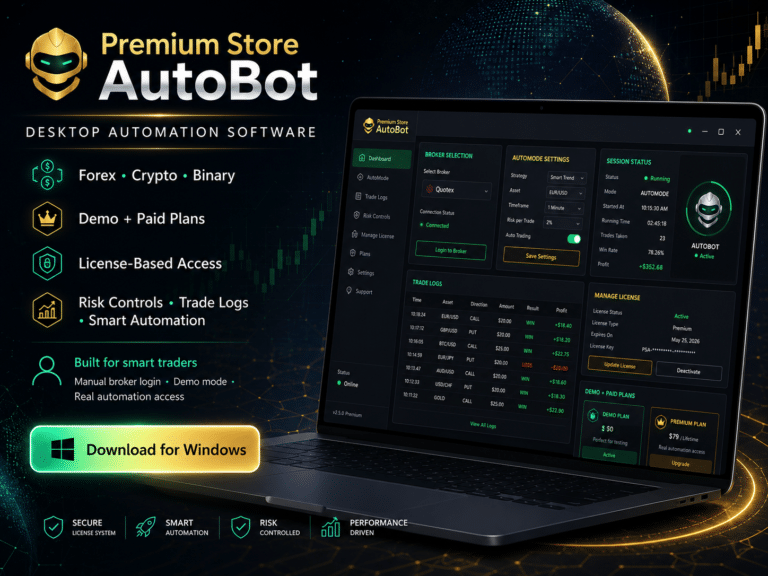
Everything you need in one desktop app
Premium Store AutoBot keeps your trading organised: one place to choose your market, set your limits, run sessions and review what happened.
- AutoMode trading with your own settings
- Demo mode and paid plan access
- Risk and amount controls for every session
- Trade logs and session history
- Secure license activation
- Setup help from our team on Telegram
Built for disciplined trading
The tools that help you trade the same way every session.
AutoMode trading
The bot places trades automatically based on the market and settings you choose.
Risk & amount controls
Fixed amount per trade and session limits, so one bad session cannot run away.
Trade logs
Every session action, mode and result is saved, so you always know what happened.
Demo mode
Practise with a demo account before you trade with real money.
Secure license
License-based access for Basic, Pro and VIP plans, managed inside the app.
Real setup support
Our team helps you install, activate and configure AutoBot on Telegram.
Choose your AutoBot plan
Start with a 7-day free trial, then pick monthly or yearly billing. Yearly plans cost less per month.
Basic
Monthly or yearly billing. Includes license activation and Telegram setup help.
Choose BasicPro
Monthly or yearly billing. Includes license activation and Telegram setup help.
Choose ProVIP
Monthly or yearly billing. Includes license activation and Telegram setup help.
Choose VIPNot sure which plan fits? Ask us on Telegram.
Signal Tools For Binary, Forex & Crypto
Our two main signal tools for traders who prefer to place trades themselves. Both give real-time signals for Binary, Forex and Crypto markets.
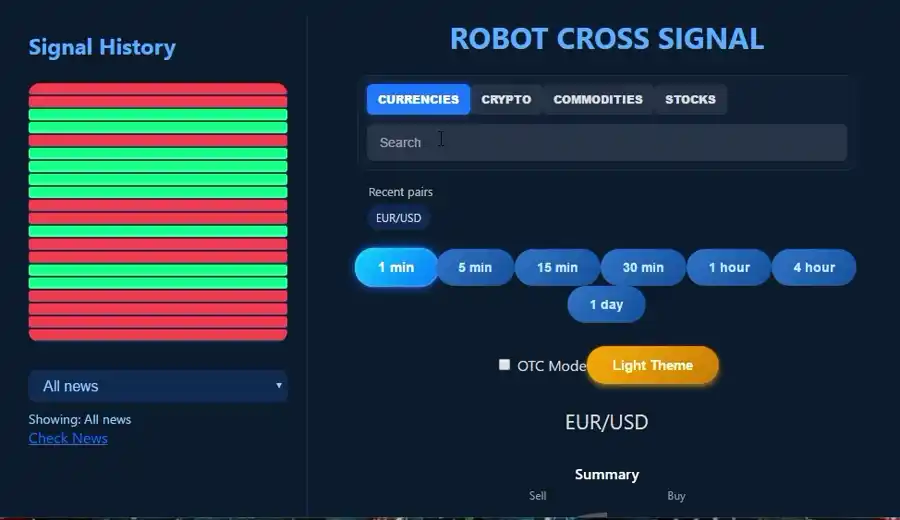
Cross Signals Robot
- Real-time trading signals on your screen
- Works on Windows and mobile
- Monthly, yearly or lifetime access
- Setup help from our team

Virtual Robot V-24 PRO
- Real-time signals for all three markets
- Works on Windows and Android
- Yearly or lifetime access
- Setup help from our team
Which tool is right for you?
A quick side-by-side to help you choose.
| Premium Store AutoBot | Cross Signals Robot | Virtual Robot V-24 PRO | |
|---|---|---|---|
| How it works | Places trades automatically inside your rules | Shows signals, you place the trade | Shows signals, you place the trade |
| Markets | Forex, Crypto, Binary | Binary, Forex, Crypto, OTC | Binary, Forex, Crypto |
| Devices | Windows 10 or later | Windows and mobile | Windows and Android |
| Free trial | 7 days | — | — |
| Price from | $29 / month | $29 / month | $99 / year |
| Best for | Traders who want hands-free sessions | Hands-on traders on a small budget | Hands-on traders who want yearly access |
| View AutoBot → | View details → | View details → |
What traders say about us
Real reviews from our Trustpilot page, shown word for word.
Professional team and strong tools
“Professional team and strong tools. I feel more confident trading than before.”
Great customer service
“Great customer service …”
Very expedient
“Very expedient”
The guys are really awesome
“The guys are really awesome..”
Good company
“Good company and meke me good trader.”
Helped solve my software problem
“This wonderful gentleman really helped me solved me my software problem.”
Selected 5-star reviews from our Trustpilot page, where you can read every review. Individual experiences vary and are not a guarantee of results.
You stay in control of your money
AutoBot is software that runs on your computer. It does not hold your money.
Your money stays with your broker
Funds stay in your own trading account. Premium Store never holds your money.
Your limits come first
The bot works only inside the amount and session limits you set.
Demo before live
Test everything on a demo account before using real money.
Secure checkout
Card payments are processed by Stripe. Crypto payment is also available.
Trading bot guide for beginners
Honest answers to the questions new traders ask most before they use a trading bot.
1What is a trading bot?
A trading bot is software that places trades automatically by following a set of rules. Instead of watching charts and clicking every trade yourself, you set the rules once, such as the market, the amount per trade and when to stop, and the bot carries them out.
2How does automated trading work?
The bot watches the market and waits for the conditions in its strategy. When those conditions appear, it checks your limits and then places the trade on your account. Good bots also keep a log of every action, so you can review your sessions afterwards.
3Are trading bots safe to use?
A bot is only a tool. It cannot remove the risk of trading, and no bot can guarantee profit. To stay safe, start on a demo account, use small fixed amounts, set clear session limits and only trade with money you can afford to lose. Choose software that never asks you to send it your funds.
4How do I choose the right trading bot?
Look for clear rules you can control, a demo or trial option, honest marketing without profit promises, real customer reviews and responsive support. Decide first if you want full automation, like AutoBot, or signals that you act on yourself, like Cross Signals Robot.
Build your trading skills
Guides, courses, indicators and strategies to help you understand the market and trade with discipline.
Ebooks
Price action guides you can read at your own pace.
Browse ebooks →Courses
Video lessons that explain setups step by step.
Browse courses →Indicators
Tools that help you read trends and key levels.
Browse indicators →Strategies
Rule-based plans with clear entries and risk limits.
Browse strategies →Join our free Telegram community
Get community updates, live session alerts and help with setup, straight to your phone. Free to join, leave any time.
- 1Community updates and announcements
- 2Live session alerts
- 3Setup help for our tools
- 4New tool and update news
Frequently asked questions
Quick answers about AutoBot, plans and support.
What is Premium Store AutoBot?
It is a Windows desktop app that automates your trading workflow. You choose the market, the amount per trade and your session limits, and the bot places trades and records every action in a trade log.
Do I need trading experience?
No coding or advanced skills are needed, and our team helps you with setup. We still recommend learning the basics and practising on a demo account before trading with real money.
Which brokers does AutoBot work with?
AutoBot works with selected broker accounts, and we are adding more broker integrations soon. Message us on Telegram and we will confirm whether your broker is supported before you buy.
What is the difference between AutoBot and the signal tools?
AutoBot places trades automatically inside the limits you set. Cross Signals Robot and Virtual Robot V-24 show real-time signals on your screen, and you decide whether to place each trade yourself.
Do the signal tools work for Forex and Crypto?
Yes. Both Cross Signals Robot and Virtual Robot V-24 PRO provide signals for Binary, Forex and Crypto markets. Cross Signals Robot also covers OTC markets.
Is there a free trial?
Yes. You can start a 7-day free trial and test AutoBot with a demo account before choosing a paid plan.
What do I need to run it?
A computer with Windows 10 or later, a stable internet connection, about 4 GB of RAM and 1 GB of free disk space, plus a trading account for live sessions.
Does AutoBot guarantee profit?
No. No bot or signal can guarantee profit, and every trade can lose money. AutoBot helps you follow a consistent process inside your own limits. Only trade with money you can afford to lose.
How do I get help?
Join us on Telegram or email support@premiumstoreco.com. Paying customers get priority support.
Ready to automate your trading?
Join our Telegram community for free, or start your 7-day AutoBot trial today.